
Introduction
In KLARA, you start accounting by clicking “Accounting” in the left menu bar. The setup process guides you through all the basic steps—from selecting the legal form and entering the opening balance sheet to configuring VAT settings. This article explains how the setup works and what you need to keep in mind.
Chart of Accounts Provided in KLARA
- The income statement is based on Art. 959b para. 2 of the Swiss Code of Obligations.
- The chart of accounts in KLARA is predefined. This helps you work with workflows, even without extensive accounting knowledge. Subaccounts can be recorded within the accounts using so-called Tags, helping you structure your accounting even more.
Legal Form and Fiscal Year
- Start by selecting your legal form.
- Set the start and end dates of the fiscal year.
- This does not necessarily have to be the calendar year from January to December (e.g., June of year X to May of the following year).
- If you are in your first year, you can also have a shortened year or apply for an extended year (with the tax administration).
- Important: This setting can no longer be changed once you have entered your first transactions.
- Select whether this is your first fiscal year:
- First fiscal year: Only subaccounts can be entered—no prior-year figures.
- Subsequent year: You can enter prior-year figures and upload the closing statements.
VAT Liability
- Default setting: not subject to VAT.
- If you are subject to VAT, select:
- Calculation method (effective or flat tax rate)
- Accounting method (agreed or received)
- Effective date
-
Important:
These settings can no longer be changed retroactively for transactions once transactions, invoices, or quotes exist.
If there are errors, all relevant data must be deleted in order to make changes. - If you become subject to VAT, for example in the second year, do not forget to make this setting so that it is applied to all new transactions in the new year.
-
If you are unsure whether you are subject to VAT, seek advice from a specialist:
Entering the Opening Balance Sheet
The opening balance sheet shows what your company owns at the start date (e.g., bank balances, equipment) and what it owes (e.g., a loan). For a new company in its first fiscal year, this is often only the balance of its business account.” To record the share capital, see the following additional article: Entering the Share Capital of a Newly Founded Company
- Enter your opening balances here based on the prior-year financial statements.
- This is not possible for the first fiscal year (no prior-year figures are available).
- You can start with just a few accounts (e.g., bank) and add the rest later.
Functions in the opening balance sheet:
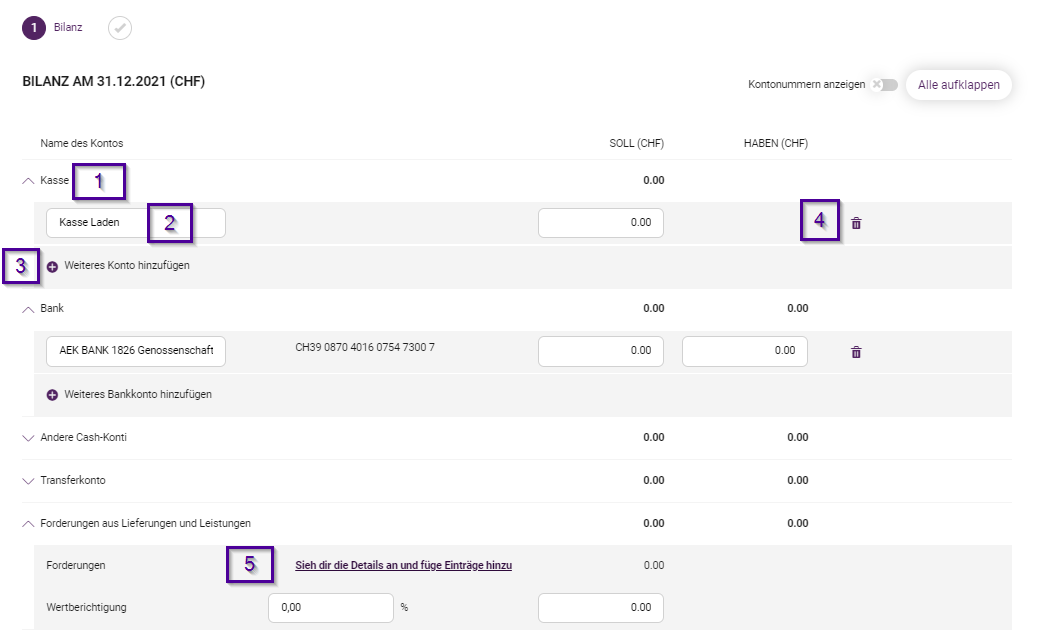
- Expand or collapse account groups
- Add new subaccounts
- Assign descriptions freely
- Delete accounts that are not yet being used
- Open and save detailed views (e.g., accounts receivable list)
Important:
- Always click “Save” to apply new accounts.
- You can save the balance sheet even if it is not yet balanced.
- Complete it with “Save and close” only when the balance sheet is balanced.
What to Do if the Opening Balance Sheet Is Not Balanced?
- Check your figures against the prior-year financial statements.
- Common errors include transposed digits or missing transactions.
- KLARA automatically assigns the difference to account 2975 “Opening balance sheet not balanced”.
- Subsequent corrections are possible—the difference transaction disappears automatically.
- At the latest when changing fiscal years, the opening balance sheet must be balanced.
Structure of the Balance Sheet in KLARA
- KLARA generally uses the SME chart of accounts.
- Many accounts are mirror accounts:
- Example: “Bank” is shown as an asset when it has a debit balance and as a liability when it has a credit balance.
- In the opening balance sheet, these accounts are assigned to their usual side (e.g., bank under assets).
Subsidiary Ledgers and the Accrual Method
- KLARA automatically maintains accounts receivable and accounts payable lists.
- If you have not previously maintained subsidiary ledgers, enter all outstanding items individually in the opening balance sheet.
- This ensures that the automatic bank reconciliation works correctly.
- KLARA uses the accrual method:
- Receivables and liabilities owed to authorities should be entered correctly at the start.
- When payment is made, it is automatically posted to the corresponding current account.
Subsidiary ledgers: A separate list of outstanding invoices, such as who still owes you money (accounts receivable) or whom you still owe money (accounts payable).
Accrual method: This means that an invoice counts as income or expense as soon as it is issued—not only when payment is received.
Current account: An ongoing account for a customer, supplier, partner, or private individual.
Conclusion
Correctly setting up accounting in KLARA is essential for accurate, automated bookkeeping. When entering the information, pay particular attention to the fiscal year, VAT settings, and a balanced opening balance sheet. Many settings can no longer be changed later, so take enough time for this step.